
strongiptv is the kind of search term that looks simple until you open a few results and realize that several different products can use similar “Strong” branding. Some pages may describe an IPTV subscription, others may point to a player or application, and others may belong to unrelated providers that happen to use similar words in their names. That makes the first job for anyone researching strongiptv very clear: identify exactly which service, website, or application you are dealing with before you buy, install anything, or enter account credentials.
For this guide, the specific provider being discussed is Strong8KTVs through strong8ktvs.us. The original article supplied for this rewrite describes the service as offering live television, movies and series, EPG support, several device categories, multiple simultaneous-connection options, and a 24-hour trial. Rather than repeating the same “what it is, devices, setup, troubleshooting” pattern used across many IPTV articles, this version is organized around the decisions a real user actually has to make: verifying the provider, understanding what part of the system does what, testing performance, choosing hardware, deciding how many connections are needed, and knowing when a problem belongs to the app, account, device, or network.
Table of Contents
Quick Answer: What Should You Know About StrongIPTV First?
strongiptv is not one universal technical standard or one guaranteed provider name. It is a broad term used around Strong-branded IPTV products and services, which is why similar names should not automatically be treated as the same company, account system, channel library, or support team. In this article, Strong8KTVs is the specific provider referenced. The safest approach is to use the exact provider website connected to your subscription, keep the correct activation details, and separate the IPTV service from the application you use to watch it. Once those pieces are clear, strongiptv becomes much easier to test and troubleshoot.
Start by Verifying Which StrongIPTV Provider You Mean
The first thing to understand about the service is that the name itself is not enough to prove who operates a service. Search results can contain wording such as “Strong IPTV,” “StrongIPTV,” “Strong Pro,” or “Strong 8K,” and those names may look related even when the websites, subscriptions, accounts, pricing, and support systems are completely separate. That is why you should always read the full domain and keep the original purchase or activation information instead of assuming that two similar names belong to the same business.
For Strong8KTVs users, the central reference point in this article is the Strong8KTVs homepage. If you purchase or test through that provider, keep the website bookmarked, save the activation message, and keep the support route associated with that same service. If a problem appears later, those details help you avoid contacting a completely unrelated this IPTV service seller that cannot see or manage your account.
Why This Matters Before You Even Think About Channels
Many IPTV problems start before streaming begins because users mix together provider names, apps, logins, and websites. Someone may download a player with a Strong-related name and assume it includes a subscription, or purchase from one website and later expect a different similarly named website to reset the account. The result is confusion that looks technical even though the real issue is identity. With strongiptv, verifying the provider first is a simple step that prevents payment mistakes, login confusion, and wasted support requests later.
Understand the Four Parts of a StrongIPTV Setup
A complete the setup setup is easier to understand when you divide it into four separate parts: the provider account, the internet connection, the IPTV player, and the viewing device. The provider supplies access to the live channels and on-demand library. Your internet connection carries those streams. The player organizes the account into a usable interface with channels, movies, series, favorites, and EPG data. Finally, the Smart TV, Fire TV device, Android box, computer, phone, or tablet displays the content.
This separation becomes very useful when something goes wrong. If the username is rejected on every compatible device, the account or credentials deserve attention. If the same strongiptv account works on a phone but buffers badly on the television, the problem is more likely related to the television, player, or home network. If video works but the guide is empty, the EPG or player settings should be checked instead of treating the whole subscription as broken.
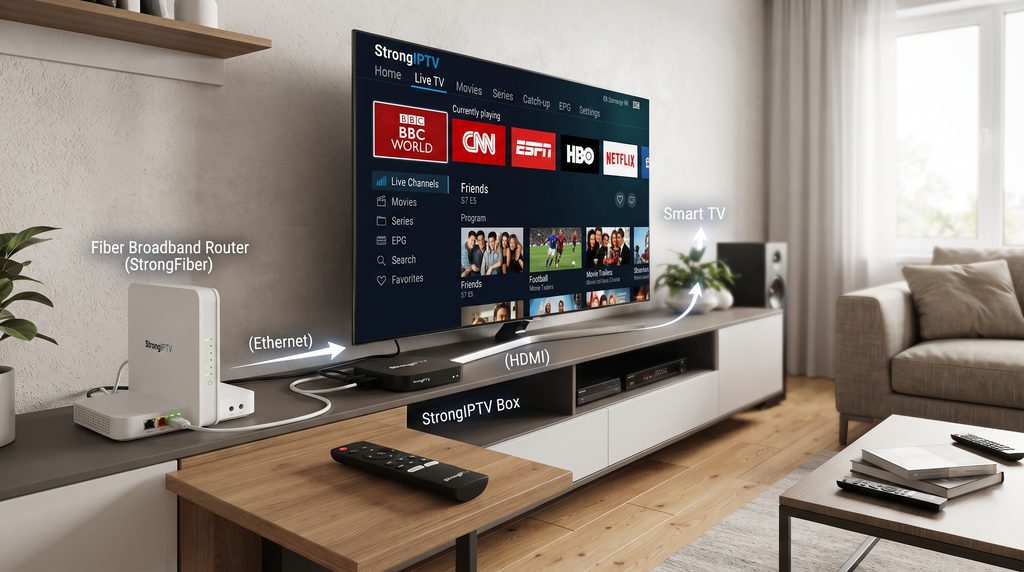
StrongIPTV Service vs IPTV Player: Do Not Mix Them Up
One of the most important distinctions in the provider is the difference between the service and the application. The service provides the actual subscription access, live streams, VOD catalog, allowed simultaneous connections, and often the EPG source. The IPTV player is the interface that accepts compatible credentials and presents that content on your screen. A player can include search, favorites, category filters, subtitles, parental controls, external playback options, and different layout choices, but those features do not create a subscription.
That distinction matters because downloading a player does not automatically give you channels, and changing players does not necessarily fix an expired or invalid account. At the same time, a valid strongiptv subscription may work with more than one compatible player, which gives users some flexibility if one application performs poorly on a particular device. Separating account problems from application problems prevents unnecessary reinstalling and makes troubleshooting much faster.
| StrongIPTV Service | IPTV Player |
|---|---|
| Provides subscription access | Provides the viewing interface |
| Supplies live streams | Plays the streams |
| Supplies movies and series | Organizes VOD content |
| Controls simultaneous connections | Handles menus and navigation |
| May supply EPG data | Displays the EPG |
| Provides account credentials | Accepts compatible credentials |
Use the StrongIPTV Trial to Answer Real Buying Questions
A free trial is most valuable when you use it as a test rather than as free television for a day. The source article states that Strong8KTVs provides a 24-hour free trial, which gives you enough time to check whether the the subscription service fits your normal setup. Test it on the television or streaming device you actually plan to use, on the same internet connection, and during the same hours when your household is usually active.
Start with the channels you care about most. It does not matter whether a provider advertises a huge catalog if your regular sports, news, entertainment, or regional channels are unreliable. Then check movies and series, search, EPG information, loading speed, audio synchronization, and how quickly the player moves between categories. The point of the strongiptv trial is to discover what your everyday experience would feel like after paying, not to prove that one random channel can open.
A Better Trial Checklist
- Open your most-watched live channels first.
- Test sports or other fast-moving content if that matters to you.
- Check several movies and series rather than only live TV.
- Confirm that audio remains synchronized with the picture.
- Inspect EPG accuracy on the channels you actually watch.
- Test channel-switching speed and menu responsiveness.
- Use the same Wi-Fi or Ethernet setup you expect to keep.
- Try the service during busy evening hours.
- Test a second compatible device if one problem seems device-specific.
By the end of the trial, you should know whether the service fits your real viewing routine. If the important channels are stable, the player feels responsive, the VOD library is easy to browse, and the guide is useful, that is meaningful evidence. If only a few random channels work well while your main categories struggle, that is also valuable information before committing to a longer plan.
Choose the Device Around Your Real Viewing Habits
strongiptv can work across several device categories when a compatible player exists, but “supported” does not always mean “equally good.” A Smart TV can be the cleanest option because the application runs directly on the television. Fire TV and Android TV devices often offer a wider selection of players and can be upgraded separately from the screen. Computers are useful for troubleshooting, while phones and tablets provide portable access.
The Google TV help center explains how applications are installed and managed on compatible Google TV and Android TV systems, which can help when the issue is with the device or application rather than the this IPTV setup account. The main thing is to confirm that your preferred player supports the login format you receive and runs well on your exact hardware.
When a Smart TV Is Enough
A Smart TV is usually enough when the operating system supports a reputable IPTV player, the television has enough processing power for a large library, and the network connection is stable. Install the application from the official app store where possible, enter the supplied strongiptv credentials, and give the initial playlist, VOD data, artwork, and EPG time to synchronize before deciding the television is too slow.
Older Smart TVs can struggle with large libraries because their processors and memory are more limited than modern streaming boxes. If the same the account account feels smooth on another device while the television app freezes or responds slowly, the hardware may be the real bottleneck. In that case, adding a newer external device can be more useful than changing the subscription.
When Fire TV or Android TV Makes More Sense
Fire TV and Android-based devices are popular for strongiptv because they are flexible and support many media applications. The quality of the experience still depends heavily on the specific hardware. A cheap Android box with weak memory and storage can behave very differently from a better-supported device, especially after a large EPG database and thousands of channel entries have been loaded.
Keep enough free storage for the player, guide data, artwork, and updates. Restart the device if the interface becomes unusually slow and remove unused applications when storage is nearly full. The subscription itself may be perfectly healthy while the local device struggles to process the the service library efficiently.

Choose StrongIPTV Connections Based on Simultaneous Viewers
Connection count is another area where people often pay for the wrong thing. A connection usually means one simultaneous active stream rather than one device where the strongiptv account is installed. You might configure the service on a living-room television, a bedroom television, a phone, and a computer but still need only one connection if just one person watches at a time.
A couple who frequently watches different programs on separate screens usually needs at least two simultaneous connections. A larger family may need three or more during sports events, evenings, or weekends. Strong8KTVs provides several options through its pricing page, so the better decision is to think about the busiest normal viewing period rather than counting every device in the home.
| Household Pattern | Connections to Consider | Reason |
|---|---|---|
| One person watches at a time | 1 | Only one stream is active |
| Two people watch different content | 2 | Two simultaneous streams are required |
| Three independent viewers | 3 | Prevents one stream from interrupting another |
| Larger household | Compare 4–5 | Useful during busy evenings or events |
| Several installed devices, one viewer | 1 may still be enough | Installed devices and active streams are not the same |
Choosing too many the platform connections adds unnecessary cost, while choosing too few can create account or playback problems when several people start streaming at once. Match the plan to real usage, not to the maximum number of screens you own.
Why StrongIPTV EPG Quality Matters More Than People Expect
EPG stands for Electronic Program Guide, and it can completely change how comfortable strongiptv feels in daily use. Without a useful guide, a large IPTV library can feel like a huge list of channel names with no context. With EPG data, the player can show what is currently playing, what starts next, and the schedule for supported channels, making the interface feel much closer to traditional cable or satellite television.
Guide coverage is rarely identical across every channel and region, so test the EPG on your own favorites during the trial. If guide information disappears but video still works, refresh EPG data in the player before assuming the the subscription service has failed. Also check the device time zone and any guide offset settings because incorrect time configuration can make correct schedule data appear several hours wrong.
Turn a Huge StrongIPTV Library Into Something Usable
A large channel count sounds impressive until you have to find the same ten channels every night. Once the service is working, create a favorites group around your actual habits. Keep sports, news, family channels, regional programming, and everyday entertainment easy to reach. Hide or ignore categories you never use if the player supports category controls. Search is usually faster when you know exactly what you want, while the EPG is better when you are browsing live television.
Movies and series should usually remain inside their own VOD sections instead of being mixed with live-channel favorites. Recently watched features can save time, and parental controls can help in family homes. Most users interact with only a small part of a giant strongiptv catalog, so good organization can improve the experience more than adding thousands of extra channels that are never opened.
Judge StrongIPTV Streaming Quality the Right Way
Resolution is only one part of streaming quality. A this IPTV service channel can display a high-resolution label and still look worse than a lower-resolution source if compression is heavy, bitrate is poor, frame rate is weak, or the stream buffers. Fast sports can reveal frame drops and motion problems quickly, while movies often expose compression in dark scenes. Audio synchronization is another practical quality signal that is easy to overlook during a quick test.
The source article notes that Strong8KTVs promotes several quality levels rather than treating every stream as identical. That is a realistic way to think about a broad strongiptv library because original sources differ. When testing, compare different content types instead of judging the entire service from one channel. Consistent quality on the channels you actually use matters much more than one impressive maximum-resolution label.
Do Not Ignore the Home Network
A weak Wi-Fi signal can make a the setup service look unreliable even when the account works perfectly. If buffering affects several channels, test another application or internet service on the same device and compare the connection from the room where the television is located. If possible, use Ethernet as a troubleshooting comparison. When a wired connection fixes the problem, the home network deserves attention before the subscription.
Troubleshoot StrongIPTV by Isolating the Failing Part
The best strongiptv troubleshooting method is to identify whether the problem belongs to the account, player, device, network, or one specific source. If one channel fails but everything else works, the issue is probably limited. If every channel fails across multiple devices, the account or service status deserves more attention. If the account works on a second device, focus on the original hardware or application instead of repeatedly resetting the subscription.
| Problem | What It Suggests | Best First Check |
|---|---|---|
| One channel buffers | Possible source-specific issue | Open several other channels |
| Every channel buffers | Network, device, or service issue | Test the internet and restart the device |
| Login rejected everywhere | Credentials or account status | Re-enter details carefully |
| EPG missing but video works | Guide or player issue | Refresh EPG data |
| App freezes on one device | Local hardware or software issue | Restart and test another device |
| VOD fails but live TV works | Possible VOD-specific issue | Try several titles |
| Works close to router only | Weak Wi-Fi coverage | Improve signal or test Ethernet |
| Everything stops across devices | Account or provider issue | Contact support |
When to Stop Troubleshooting
If you have checked the account details, restarted the player and device, tested another channel, compared a second device, and confirmed the network is working normally, continuing to change random settings usually creates more confusion. Strong8KTVs users can use the contact page for account or service-related support. When asking for help, explain the device, player, exact error, whether the account worked before, and which troubleshooting steps you already tried. That gives support far more useful information than simply saying the provider does not work.
Who StrongIPTV Makes Sense For
strongiptv makes sense for viewers who want internet-based live television and VOD across common streaming devices, value a broad content library, and prefer the flexibility of choosing a compatible player rather than relying only on traditional cable or satellite hardware. It is especially useful for households that understand how many simultaneous streams they need and are willing to test the service before choosing a longer plan.
It makes less sense to choose the service based only on a familiar-sounding brand name, a giant channel count, or a high-resolution badge. If your preferred channels perform poorly, the EPG is not useful for your region, your device cannot handle the player smoothly, or the connection plan does not match the household, the marketing numbers will not solve those problems. A better buying decision comes from testing the exact channels, devices, and usage conditions you expect to live with.
Frequently Asked Questions About StrongIPTV
Can StrongIPTV work on Fire TV or Android TV?
Yes. Fire TV and Android TV devices are commonly used with compatible IPTV players. The quality of the strongiptv experience depends partly on the hardware, free storage, application quality, and network connection, so weaker devices may feel slower with large playlists and EPG databases.
Does Strong8KTVs offer a free trial?
Yes. The source article states that Strong8KTVs provides a 24-hour trial through WhatsApp. Use the trial to test the service on your main device, with your normal network, during the hours you usually watch, and focus on the channels and VOD categories that actually matter to you.
How many connections do I need?
Choose based on the maximum number of simultaneous viewers rather than the number of devices where strongiptv is installed. One person watching at a time may need only one connection even with several configured devices, while two people watching different streams at the same time normally need two.
Why does StrongIPTV buffer?
Buffering can come from the individual stream, home network, Wi-Fi signal, device, application, or service. Test several channels, compare another device, and check the network from the room where the player is being used. If the subscription works correctly on another device, the original hardware or local network becomes a stronger suspect.
What should I do if the EPG disappears?
Refresh the guide data inside the IPTV player and check the device time zone or guide offset. If video continues to work, the missing guide does not automatically mean the entire strongiptv service is down. Test EPG coverage on your favorite channels because availability can vary between categories and regions.
Where do Strong8KTVs users get support?
Use the provider’s own contact route for service and account questions. Describe the device, player, exact error, and steps already attempted rather than posting credentials publicly. Keeping support tied to the same provider is especially important with the provider because similarly named services may be unrelated.
Final Thoughts on StrongIPTV
strongiptv is much easier to evaluate when you stop thinking of it as one single product and instead separate the provider, subscription, player, device, network, and support route. Similar names can create confusion, so verifying the exact website comes first. After that, the smartest approach is to test the real channels you care about, use the device and internet connection you plan to keep, check the EPG and VOD experience, and choose a simultaneous-connection count that reflects the way your household actually watches.
For Strong8KTVs users, the practical path is straightforward: begin from the provider website, inspect the channel list, request the trial, test performance under normal conditions, organize the player around your favorites, and contact the correct support source when an issue cannot be isolated locally. If your important channels are reliable, the interface remains responsive, VOD and EPG are useful, and the plan fits the household, the service can provide a flexible and practical streaming setup without relying on brand similarity or large advertising numbers to make the decision for you.