iptv strong pro is a search phrase that can point to three different things: an IPTV subscription, an IPTV player with premium features, or a Strong-branded service package. That ambiguity matters because a player and a subscription do completely different jobs. Buying an app does not automatically create channel access, while buying a subscription does not necessarily lock you into one particular player. Before comparing prices or devices, the first job is to identify which kind of product you are actually looking at.
The useful way to evaluate iptv strong pro is to ignore the word “Pro” for a moment and ask what changes in practice. Does the product give you better account access, more simultaneous connections, stronger support, a cleaner guide, useful VOD organization, broader device compatibility, or a more capable player interface? If none of those things improve, the premium label may be doing more marketing work than technical work.
This guide is built around that decision. It separates the service from the player, shows what each layer controls, explains what a genuine upgrade should improve, and gives you a practical way to test the complete setup on your television, network, and normal viewing routine. Strong8KTVs is used as the consumer-service example from the supplied source, but the same framework can be used whenever this phrase appears on another page or application.
Table of Contents
First Decode What “IPTV Strong Pro” Is Referring To
The phrase iptv strong pro is not a technical standard with one universal definition. “IPTV” describes internet-delivered television. “Strong” may identify a service family or brand. “Pro” is commonly used for upgraded applications, premium plans, or feature-rich versions. Put together, the words can describe very different products depending on the page you are viewing.
If the page asks you to buy channel access, choose a subscription duration, or select a connection count, you are probably looking at a service. If it talks about unlocking favorites, multiple playlists, advanced EPG controls, recording, interface customization, or removing ads, you may be looking at a player upgrade. If it includes both account access and an app, determine which features belong to the service and which belong to the software.
What the page emphasizes
Most likely product
What to verify
Channels, VOD, subscription duration
IPTV service
Content, account term, connections, support
Favorites, EPG layout, player controls
IPTV player
Compatible login formats and device support
Premium plan or “Pro” tier
Service or app upgrade
Which features actually change
Username, password, server details
Subscription access
Correct authorized credentials and provider
This distinction prevents one of the most common iptv strong pro mistakes: paying for the wrong thing. A beautiful player cannot supply channels by itself when it requires an external subscription, and a good subscription can still feel clumsy when used through a weak player. Identify the product first, then evaluate it on the right criteria.
What Should a “Pro” Upgrade Actually Improve?
The word “Pro” has value only when it corresponds to a useful difference. For an IPTV player, that might mean stronger EPG controls, better favorites, multiple playlist support, cleaner search, improved playback options, or interface customization. For an iptv strong pro subscription, the upgrade could instead involve more simultaneous streams, broader content access, improved support, or another clearly stated account benefit.
Do not assume the premium version is automatically better for you. If your normal setup already gives you stable playback, fast channel switching, good search, favorites, and a usable guide, extra controls may not change your daily experience. A feature becomes valuable when it removes a problem you actually have. That is the standard to use when deciding whether the premium option deserves a higher price.
Ask “What Gets Better?” Before You Ask “How Much Is Pro?”
Write down the limitation you want to solve. Maybe the free player has poor guide controls. Maybe the household needs two simultaneous streams. Maybe the current app is slow on the television. Maybe support is difficult to reach. Now compare the basic and premium options against that exact problem. If the premium option improves the thing you care about, the upgrade has a reason to exist. If it simply adds a label and features you will never use, the basic option may be enough.
The Four-Part IPTV Strong Pro Stack
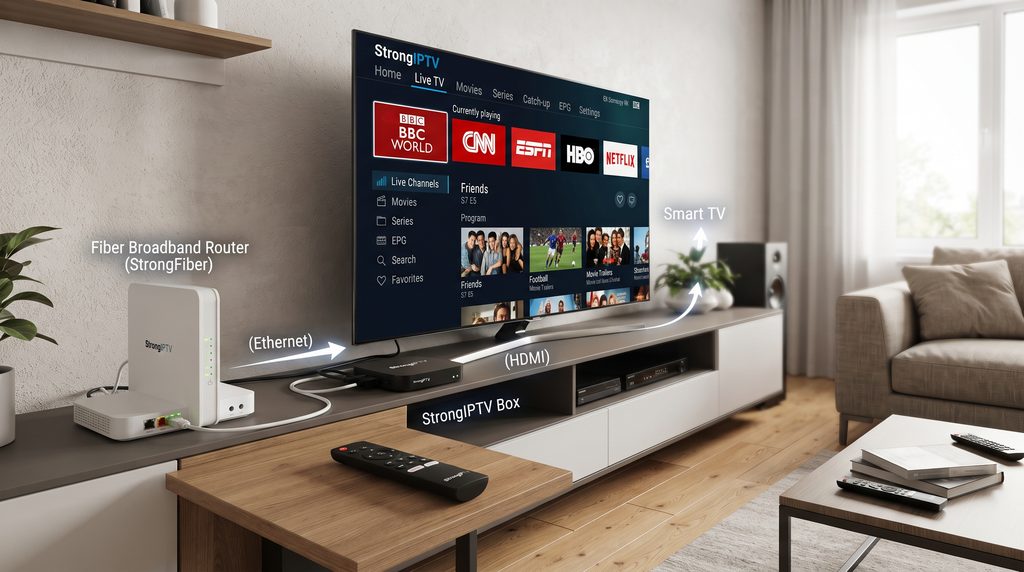
A complete iptv strong pro experience is easier to understand as four separate layers: provider access, player software, network delivery, and playback hardware. Each layer can improve or damage the final result, and each requires a different fix when something goes wrong. Treating all four as one product makes troubleshooting needlessly confusing.
The provider layer controls the account, available streams, VOD access, connection rights, and support. The player organizes that access into categories, favorites, EPG, search, and playback controls. The network carries the stream continuously. The device decodes it and displays the interface. Good overall performance requires all four layers to cooperate, which is why one customer’s perfect experience does not guarantee the same result on different hardware and Wi-Fi.
Layer
Main responsibility
Typical failure
Provider
Account, streams, VOD, connections
Login or content unavailable
Player
Interface, EPG display, favorites, playback
Slow navigation or poor guide behavior
Network
Continuous data delivery
Buffering and instability
Device
App performance and video decoding
Freezing, crashes, sluggish interface
When Paying for a Better IPTV Player Makes Sense
A player upgrade can be worthwhile when the subscription is healthy but the interface is holding it back. Large channel and VOD libraries are difficult to use without fast search, favorites, sensible categories, and a reliable guide. If a basic application technically plays the subscription but makes every evening feel like scrolling through an unorganized database, better software can improve the experience without changing the provider.
Look for player features that save time rather than features that merely sound advanced. A responsive EPG, easy favorite management, search across live and on-demand content, fast category switching, clear subtitle controls, and reliable resume behavior are practical. Multi-playlist support is valuable if you actually manage more than one authorized subscription. Advanced customization is useful only if you plan to use it.
Test the Same Account in Two Compatible Players
If the account format allows it, comparing the same subscription in two compatible players is one of the cleanest tests you can run. Use the same device and network, then compare playlist-loading time, guide behavior, channel startup, VOD navigation, search, and general responsiveness. If the second player feels dramatically better while the streams themselves are unchanged, you have isolated the interface as the real upgrade opportunity.
When the Subscription Matters More Than the Player
A better app cannot repair weak provider access. If important channels are missing, account credentials expire incorrectly, several unrelated streams fail, or the service does not allow enough simultaneous connections, changing the player will not solve the underlying problem. In those situations the iptv strong pro subscription itself deserves more attention than the interface.
For Strong8KTVs, the source provides a Strong 8K channel list that can be used to check the specific service offer. Do not judge a library only by the total channel count. Identify the networks, sports categories, regions, or languages that matter to you and verify them during the trial. The useful size of the library is the portion you actually watch.
Choose Smart TV, Fire TV, or Android TV Based on the Weakest Part of Your Setup
Device choice should solve a practical problem. If your Smart TV is modern, responsive, and has a compatible player, running iptv strong pro directly on the television can be the cleanest setup. You avoid another box, another power cable, and another remote. The drawback is that television app stores and hardware age differently, so a good display can outlive the processor and application ecosystem built into it.
Fire TV and Android TV devices are useful when the television itself becomes the weak link. They can offer broader player choices, newer software, and hardware that is easier to replace than an entire television. The Amazon Fire TV help center provides official device-side guidance for application management and common Fire TV issues, which is useful when iptv strong pro works elsewhere but one Fire TV setup is behaving badly.
Do Not Judge the Account on a Device That Cannot Handle the Interface
Large playlists, artwork, EPG databases, and VOD metadata can place more pressure on weak hardware than a simple streaming app. If the service feels sluggish on an older Smart TV but responds quickly on a capable streaming box, the account has not suddenly improved; the hardware bottleneck has been removed. Test the exact device you plan to use before buying a long subscription or a paid player upgrade.
Use Three Content Tests to Judge IPTV Strong Pro Streaming Quality
Quality should be tested with different types of content because different weaknesses show up in different places. A slow news channel can look fine even when a sports feed has poor frame rate. A bright demo clip can hide compression that becomes obvious in a dark movie. One short stream therefore tells you very little about overall streaming quality.
Test One Fast-Motion Sports Feed
Sports reveal motion smoothness, frame rate, compression, audio synchronization, and stability under live demand. Watch long enough to see whether the stream remains steady rather than simply confirming that it opens. If sports are important to you, the best trial is one that overlaps with an event you actually care about.
Test One Detailed Movie or Series Episode
Movies reveal different issues: shadow detail, color gradients, compression in dark scenes, subtitle behavior, VOD startup, seeking, and audio options. Search for a title yourself rather than opening only a featured item. A good iptv strong pro VOD experience should be easy to navigate as well as easy to play.
Run One Long Session Without Constant Channel Switching
Many weak services look fine during a five-minute demo. Leave one important stream running for 30 to 60 minutes during normal viewing hours. Repeated buffering, audio drift, crashes, or resolution drops become easier to spot over time. Long-session stability tells you more about the setup than a rapid tour through fifty channels.
Build Enough Network Headroom for Real Household Use
A fast internet plan is helpful, but the television does not experience the number printed on your ISP bill. It experiences the connection that reaches the device at that moment. Wi-Fi interference, distance from the router, simultaneous downloads, gaming, cloud backups, and several active streams can all reduce stability. That matters because iptv strong pro video needs data continuously, not only during a short speed test.
The FCC broadband speed guide explains that household requirements rise as more users and devices perform bandwidth-heavy activities at the same time. The supplied source says Strong8KTVs recommends about 30–50 Mbps for smooth use of its service. Treat that as a starting point for that provider, not a guarantee that every home with a 50 Mbps plan will have identical iptv strong pro performance.
Test the Busiest Normal Evening, Not an Empty Network
If three people normally use the internet at night, test iptv strong pro while the home is operating normally. A trial performed at 10 a.m. on an empty network may hide congestion that appears every evening. If buffering occurs, compare Ethernet where practical or move temporarily closer to the router. A strong improvement under wired conditions points toward Wi-Fi before it points toward the subscription.
Run a 90-Minute IPTV Strong Pro Trial Challenge Before You Buy
The supplied source links a Strong 8K free trial. Instead of treating that trial as a casual demo, use one concentrated 90-minute session to answer the questions that matter. This structure is short enough to complete in one evening but broad enough to expose obvious problems in the service, player, network, or device.
Spend 15 minutes checking your must-have live channels and categories.
Spend 20 minutes on one fast-motion sports or live feed.
Spend 10 minutes checking EPG information on familiar channels.
Spend 15 minutes using the exact device and player you plan to keep.
Spend 15 minutes leaving one priority stream running continuously.
After that first session, revisit the service later during your normal viewing period. The goal is not to inspect every channel. It is to decide whether iptv strong pro handles your real content, your actual hardware, and your home network. If the test fails on something essential, a large catalog does not compensate for it.
Use Failure Ownership to Troubleshoot IPTV Strong Pro Faster
When something fails, ask which layer owns the symptom. If the login is rejected across every compatible device, start with the account details or provider. If only one application is slow, start with the player. If the same streams buffer on one Wi-Fi connection but work through Ethernet, investigate the network. If iptv strong pro works on another device, the original hardware becomes the strongest clue.
This method is better than changing several settings at once because every test teaches you something. Reinstalling the player, resetting the router, changing the account, and clearing every cache simultaneously may eventually restore playback, but you will not know why. The next iptv strong pro problem then sends you through the same random sequence again.
Symptom
Start here
What the result tells you
Login fails everywhere
Account credentials/provider
Likely account or server issue
One channel fails
Try unrelated streams
May be one source
EPG blank, video works
Refresh guide/player
Guide layer is separate
Only one app is slow
Compare another player
Likely app or device behavior
Wi-Fi buffers, Ethernet works
Home network
Provider may not be root cause
Everything fails across devices
Provider/account support
Wider service issue becomes more likely
For Strong8KTVs accounts, the source provides a support page. When contacting support, include the device, player, symptom, whether other channels work, and what you already tested. “IPTV Strong Pro does not work” is less useful than explaining exactly which layer appears to be failing.
Basic vs Pro: When Paying More Is Actually Justified
A basic setup is enough when it already solves your needs. If the subscription has your channels, playback is stable, the guide is usable, the player is easy to navigate, and one simultaneous connection is enough, a premium label may add little. IPTV strong pro becomes worth paying more for when the upgrade removes a real limitation rather than merely increasing the feature count.
For a player, useful paid upgrades can include better guide tools, multiple playlists, improved organization, or controls you actually use. For a subscription, the value might come from additional simultaneous connections, a clearer support relationship, or a package that better matches the household. The exact meaning of “Pro” must be verified because there is no universal feature set attached to the word.
Pay for the Limitation You Want Removed
If two people need to watch at once, pay for the correct connection allowance. If the free player makes the guide frustrating, consider a better player. If the current device is the bottleneck, an app upgrade may not solve it. If the provider is unreliable, buying a “Pro” player changes the interface but not the stream source. IPTV strong pro has value when the money goes toward the layer that is actually limiting the experience.
How to Evaluate Strong8KTVs Inside the IPTV Strong Pro Framework
For readers using this phrase to find the Strong8KTVs service, start at the Strong8KTVs homepage and treat the provider as the subscription layer of the stack. Check the available content, confirm the account format works with a player on your main device, and use the trial to judge quality and stability instead of assuming the Strong or Pro wording guarantees the result.
Then evaluate the rest of the iptv strong pro stack independently. Is the player responsive? Does the EPG make your favorite channels easier to use? Does VOD search work well? Does the device remain smooth after the full library loads? Does the home network stay stable during the hours you normally watch? Those answers tell you whether the overall system fits, not merely whether one component looks good on a sales page.
If the service passes those tests, choose a plan that matches the household rather than automatically selecting the longest or most expensive option. If the trial repeatedly fails on important content, treat that evidence seriously. IPTV strong pro should earn the upgrade through measurable usability, not through the name alone.
Frequently Asked Questions About IPTV Strong Pro
Does an IPTV Player Automatically Include Channels?
Usually not. A player generally needs authorized subscription credentials or playlist information supplied by an IPTV service. The player organizes and displays that content. Installing an iptv strong pro player by itself does not necessarily create an active television subscription.
Does “Pro” Mean Better Picture Quality?
Not automatically. Picture quality depends on the stream source, resolution, bitrate, compression, frame rate, network, player, device, and display. A Pro player can improve controls or decoding behavior, but it cannot create source detail that is not present. Judge iptv strong pro quality using actual playback rather than the product label.
What Internet Speed Does IPTV Strong Pro Need?
The requirement depends on stream quality and the number of simultaneous household activities. The source says Strong8KTVs recommends roughly 30–50 Mbps for smooth use of its service. Wi-Fi strength and stability also matter, so test iptv strong pro at the actual television or streaming device rather than relying only on the broadband plan’s advertised speed.
Does Strong8KTVs Offer a Free Trial?
The supplied source says Strong8KTVs provides a 24-hour trial option through WhatsApp. Use the trial to test your important live channels, VOD, EPG, device, player, network, and longer-session stability. That gives you much more useful evidence about iptv strong pro than choosing from the branding alone.
Where Should I Get Help With a Strong8KTVs Account?
Use the support route supplied by the provider that issued the account. For the Strong8KTVs service in the source, the contact page is the relevant route for account and setup help. Keep login details private and explain the device, player, error, and tests already performed when asking about an iptv strong pro problem.
Is IPTV Strong Pro Worth Paying For?
It is worth considering when the paid version removes a limitation you genuinely have. That might be a stronger player interface, useful guide features, more connections, or a better-fitting service package. If the basic setup already meets your needs, paying more only for the word Pro may not improve anything. IPTV strong pro should justify its price with a practical difference you can see or use.
Final Thoughts: Make “Pro” Prove Itself
The easiest way to understand iptv strong pro is to stop treating it as one fixed product. First identify whether you are looking at a service, player, or premium plan. Then separate the provider, player, network, and device so you know which part controls the feature you are being asked to pay for. That one distinction prevents many bad comparisons.
Next, judge upgrades by the limitation they remove. A better player should improve navigation or controls. A better subscription should improve the account features or service relationship that matter to you. A better device should remove hardware bottlenecks. A stronger network should reduce local delivery problems. Paying for iptv strong pro makes sense only when the upgrade lands on the layer that is actually holding the system back.
Finally, use the trial as evidence. Test live channels, fast-motion sports, VOD, EPG, long-session stability, and the exact device you plan to use. Repeat important tests during your normal viewing hours. If the complete iptv strong pro setup performs well and the premium features solve real needs, the product has earned its place. If the only clear improvement is the word “Pro” on the page, keep your money.