A strong 8k iptv app is the software layer that turns an authorized Strong-style IPTV subscription into something practical on a television, Fire TV device, Android TV box, phone, tablet, or computer. The application organizes live channels, movies, series, Electronic Program Guide data, favorites, search, categories, and playback controls. The subscription provides the actual streams and account permissions. Understanding that difference prevents one of the most common setup mistakes: downloading a player and expecting the installation itself to include a working television package.
The confusing part is that there is not one universally listed strong 8k iptv app across every Strong-branded page. Current directories described in the source include Player Plus, Player Prime, Player VIP, VIP+, Fast 8K, TiviMate-style options, Windows software, and an iPhone and iPad player. Even similarly named Android players can appear with different Downloader codes on different Strong-oriented pages. That makes device compatibility, installer verification, and account format much more important than simply choosing the player with the strongest-sounding name.
If you are considering Strong8KTVs, begin with the Strong8KTVs channel list and identify the channels your household genuinely uses. Then use the Strong8K free trial with the same strong 8k iptv app and device you intend to keep after subscribing. Testing the complete setup under your own network conditions gives you much better information than an app screenshot or an old installation tutorial.
Table of Contents
What Are You Actually Installing With a Strong 8K IPTV App?
The application should be thought of as a player first. A strong 8k iptv app can take an authorized M3U playlist, Xtream-style account, or another compatible source and organize it into a television-friendly interface. Depending on the player, that can include live-TV categories, movies, series, EPG information, favorites, recently watched content, parental controls, picture-in-picture, search, or other convenience features.
What the player normally does not do is create the television subscription. Two people can install the exact same strong 8k iptv app and see completely different channel libraries because the accounts they load come from different providers or resellers. One account may contain several international regions and another may have a smaller set of countries. The interface is the same, but the subscription behind it is different.
This separation is useful when troubleshooting too. If the app opens normally but the playlist fails to load, the cause could be the credentials, server, account status, network, or playlist rather than the player itself. If the same subscription works normally in another compatible player, the original strong 8k iptv app becomes a stronger suspect. A second player can therefore help diagnose problems without forcing you to replace a subscription that may still be working perfectly.
Which Strong 8K IPTV App Fits Your Device Best?
Your device should narrow the player choices before you start comparing features. Android TV and Fire TV generally provide the widest range of Strong-oriented television apps because those platforms are well suited to remote-controlled interfaces. A strong 8k iptv app designed for Android television can make sense on a Firestick, Fire TV Cube, Android TV box, or similar device, while another application may be more appropriate on iPhone, iPad, Samsung TV, LG TV, Windows, or macOS.
Hardware also affects the experience. Large playlists can contain thousands of live channels, VOD artwork, channel logos, and several days of EPG data. A modern streaming box with enough memory and free storage will normally handle that information more comfortably than an older stick. If a strong 8k iptv app becomes slow after importing the guide, closes while loading artwork, or takes a long time to move between categories, compare the same account on another device before blaming the subscription.
Apple users should not follow Android sideloading instructions. The source describes a Strong 8K player available through Apple’s App Store for iPhone and iPad that supports user-provided M3U and Xtream-style sources. Samsung and LG users may also need a compatible player from the television’s own app store rather than an Android APK. Device compatibility matters more than forcing one strong 8k iptv app onto every screen you own.
Device
Best Approach
What to Prioritize
Fire TV
Remote-friendly Android player
Startup speed, storage, stability
Android TV
Native Android TV player
EPG, favorites, responsiveness
iPhone / iPad
App Store player
Touch interface and login support
Samsung / LG TV
Compatible television-store player
Remote navigation and native support
Windows / macOS
Compatible desktop software
Playlist support and stable decoding
Why Do Strong 8K IPTV App Downloader Codes Keep Changing?
Downloader codes are convenient on Fire TV because entering a short number with a remote is easier than typing a long APK address. The problem is that a Downloader code is only a shortcut to a hosted destination. If the distributor moves the file, replaces the APK, changes the hosting location, or publishes another build, the number can change while the name of the strong 8k iptv app stays almost identical.
The source gives several examples of this problem. Different current Strong-oriented pages can show different codes for Player VIP, Player Plus, Prime, or VIP+. One page can list Player VIP with one number while another directory publishes another. Those differences do not automatically prove that one installer is fake. They prove that a numeric shortcut should not be treated as permanent installation information.
A New Downloader Code Does Not Automatically Mean a Better App
If your current strong 8k iptv app is already installed and working correctly, there is usually no reason to reinstall it just because another website shows a newer Downloader number. A different code may point to another hosting location, another build, or another distributor rather than an important upgrade. Replacing a stable app without a clear reason can create new compatibility problems or force you to configure everything again.
When you genuinely need to install or reinstall the app, verify the current source through the support route connected to your account. Avoid APK files sent through random file-sharing pages or old tutorials that present one code as though it will remain correct forever. The strong 8k iptv app name and your provider’s current recommendation are more useful than memorizing a number.
Which Login Format Does Your Strong 8K IPTV App Need?
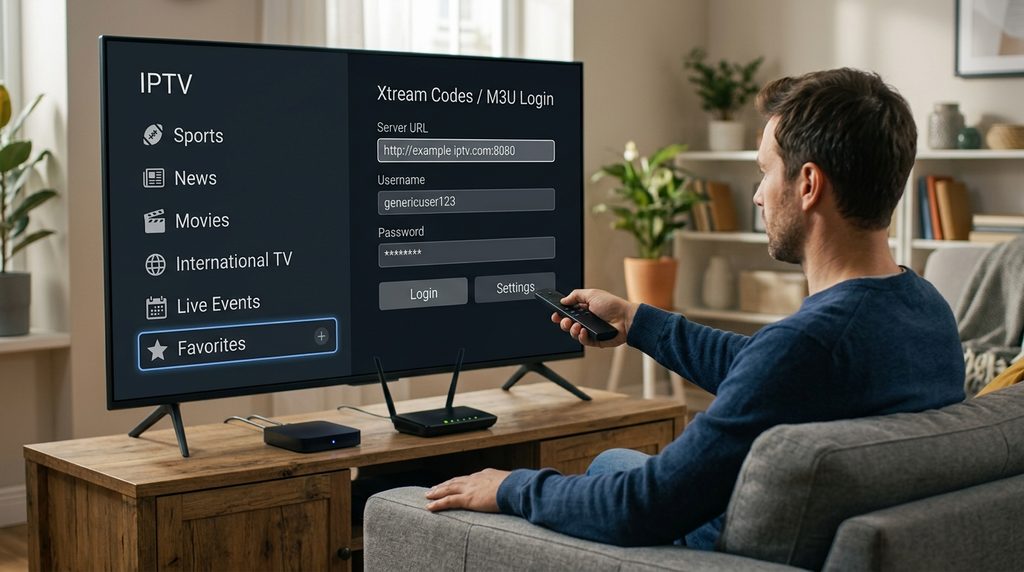
Most people setting up a strong 8k iptv app will encounter either an M3U playlist or an Xtream-style login. M3U usually arrives as a complete playlist URL and may also include a separate EPG address. Xtream-style access usually separates the server or portal URL, username, and password into individual fields. Some provider-configured players simplify the process because the server is already built into the app.
Use exactly the account format issued to you. If the strong 8k iptv app asks for a complete playlist URL, entering only your username is incomplete. If the player asks separately for the server, username, and password, pasting an entire M3U link into the server field can also create a failed login even when the subscription is active.
Small errors can look like serious service problems. One extra space, a missing character, an incorrect protocol, or server information copied from another tutorial can stop the account from loading. If the fields in the player do not match the details you received, ask the provider which setup method should be used rather than trying to convert the credentials yourself.
Protect those credentials as well. An M3U URL can include the username and password directly inside the address. If you post the full URL publicly while asking for help with a strong 8k iptv app, another person may be able to see the account information. Share the device, player name, and error message while hiding private URLs, usernames, passwords, order information, and account identifiers.
How Do You Make a Huge IPTV Library Easy to Use Every Day?
A large playlist can look impressive during the first ten minutes and become exhausting after the first week. Thousands of entries may include local television, international groups, sports backups, regional duplicates, movies, series, and channels you never watch. A good strong 8k iptv app should reduce that complexity rather than making you scroll through the entire library every evening.
The Electronic Program Guide becomes especially important in daily use. A good EPG tells you what is playing now and what comes next without requiring you to open every channel manually. Guide accuracy is more valuable than a flashy home screen when you are trying to find a match, movie, news program, or scheduled show quickly.
Build Favorites Before You Judge the Player
After the first playlist sync, create a favorites group containing only the channels your household actually watches. Add local television, sports, news, entertainment, movies, children’s programming, and important international stations. If the strong 8k iptv app allows categories to be hidden, remove countries and groups you never use from the normal browsing experience.
Then give the EPG enough time to finish its first update. Check whether program times are correct, whether your important channels contain useful information, and whether the guide remains available after restarting the player. Also confirm that the strong 8k iptv app keeps your favorites after the device sleeps or reboots.
If guide information is missing, compare another compatible player before assuming the subscription has no EPG. When the same channels lack information in every app, the guide source becomes a stronger suspect. When another player displays the data correctly, the original app’s EPG configuration deserves more attention.
Does the “8K” Name Tell You Anything About Real Picture Quality?
A strong 8k iptv app cannot transform a lower-resolution source into genuine native 8K simply because the word appears in the application name. Real picture quality depends on the original broadcast, encoding, bitrate, server delivery, network conditions, device decoder, HDMI path, and television. A display may upscale a lower-resolution stream, but upscaling is different from receiving an original native 8K source.
The better approach is to judge actual playback. During sports, watch fast motion, camera pans, scoreboards, and frame pacing. On news channels, look at text and graphics. During movies, inspect darker scenes for heavy compression. Listen for audio synchronization and see whether the strong 8k iptv app keeps the stream stable over a meaningful viewing period.
A reliable Full HD or 4K stream can provide a much better experience than a higher-resolution label attached to an unstable source. That is why the strong 8k iptv app should be evaluated as a player first. Fast navigation, useful categories, reliable EPG data, good decoding behavior, and consistent playback affect the experience much more frequently than the branding in the app name.
When a Strong 8K IPTV App Buffers, What Should You Test First?
Buffering does not automatically mean the strong 8k iptv app is bad. The original source stream, server load, ISP routing, Wi-Fi conditions, router congestion, VPN route, device memory, decoder compatibility, and background downloads can all create similar freezes. If you reinstall the application immediately, you are changing one component before proving that component caused the problem.
Start with another channel from the same category, then test a completely different group. Restart the affected stream and device. Confirm that normal internet services work properly and compare Wi-Fi with Ethernet when practical. Pause large downloads or cloud backups. These steps tell you whether the problem is isolated to one stream or appears more broadly.
Use a Second Player to Find Out Where the Problem Really Is
Load the same authorized account into another compatible player and test the same channel under the same conditions. If the second app works smoothly while the strong 8k iptv app repeatedly buffers on the same device and network, the first player’s configuration, decoder, or compatibility deserves more attention. If both players struggle in exactly the same way, the source or network becomes a stronger suspect.
Test another channel from the same category.
Try a stream from another group.
Restart the stream and player.
Restart the streaming device.
Check another video application on the same hardware.
Compare Wi-Fi with Ethernet when possible.
Pause large downloads and cloud backups.
Try the same account in another supported player.
Test another device before blaming the subscription.
Change one variable at a time. If you change the strong 8k iptv app, router settings, VPN route, DNS, server, and password together, you may eventually improve the stream without learning what actually fixed it. A controlled test makes future troubleshooting much easier.
Strong 8K IPTV App vs TiviMate: Which Interface Fits You Better?
TiviMate is useful as a comparison because it provides another interface for compatible accounts and offers deeper playlist and EPG organization. The source notes support for common formats such as M3U and Xtream-style accounts along with features such as multiple playlists, favorites, recording, catch-up, search, parental controls, and multiview. That can make it attractive to Android TV viewers who enjoy customizing their television interface.
A simpler strong 8k iptv app may still be the better option for another household. Some people want to turn on the television, open favorites, choose a channel, and start watching without navigating a large settings menu. More features are only valuable if you actually use them.
What Matters
Strong-Style Player
TiviMate-Style Player
Simple television use
Can be easier
Requires more configuration
EPG control
Depends on the build
Usually more extensive
Multiple playlists
Depends on the app
Designed for deeper management
Favorites and groups
Usually available
More customization
Best test
Same account, device, network, and channels
Compare the applications fairly. Use the same device, same network, same account, and five to ten priority channels. If TiviMate performs better, that does not mean the subscription suddenly improved. It means the player layer can change the experience. The opposite can also happen: a lightweight strong 8k iptv app can feel faster on weaker hardware than a feature-heavy alternative.
How Should You Test the App Before Buying a Long Subscription?
The strong 8k iptv app and the subscription should be tested together because a player that looks good in screenshots can still perform poorly on your hardware. For Strong8KTVs, use the Strong8K free trial on your main television or streaming device and install the player you are genuinely considering keeping.
Do not spend the entire trial opening random channels because the catalog is large. Start with ten to twenty priority channels from the Strong8KTVs channel list. Watch several for meaningful periods. If sports matter, include a real live event. Inspect the EPG, create favorites, search movies and series, test subtitles or alternate audio when relevant, and restart the strong 8k iptv app to make sure your settings survive.
Repeat important checks during normal evening viewing hours. Test the exact Fire TV, Android TV device, Smart TV, phone, or other hardware you intend to keep using. If buffering appears, compare Wi-Fi with Ethernet where possible and use another player as a reference before deciding the strong 8k iptv app is responsible.
Support should be tested too. If you do not know which player is recommended for your device, which login format the account uses, or how many simultaneous connections are supported, use the Strong8KTVs contact page before making a longer commitment. A clear answer before payment can save much more time later.
Once the strong 8k iptv app and the underlying service work reliably together, compare the Strong8KTVs pricing plans. A longer plan may reduce the effective monthly cost, but there is little reason to make a large commitment before you know that the channels, EPG, device, player, network, and support all fit your needs.
Frequently Asked Questions About Strong 8K IPTV Apps
Does a Strong 8K IPTV App Include Channels?
No assumption should be made that installing a strong 8k iptv app automatically includes a television subscription. The player is the software interface. You still need an authorized account, M3U playlist, Xtream-style login, or another supported source. The Strong iPhone and iPad player described in the source explicitly separates the player from the content subscription.
Can I Install a Strong 8K IPTV App on Firestick?
Yes, several Strong-oriented directories described in the source list Android and Fire TV player options. Fire TV’s Android compatibility makes it a common platform for this type of software. Verify the current APK source and Downloader code before installing because Strong-branded directories can publish different numbers for similarly named applications.
What Is the Current Strong 8K IPTV App Downloader Code?
There is no single Downloader number that should be treated as permanent for every strong 8k iptv app build. Different current pages can show different codes for Player VIP, Plus, Prime, VIP+, and other variants. Use the installer information connected to your current provider rather than relying on an old article.
Can I Use the Same Account in TiviMate?
Often, yes, when your provider supplies an authorized account format supported by TiviMate and allows use of third-party players. M3U and Xtream-style logins are common examples. Enter only your own credentials and keep them private.
Why Does the Strong 8K IPTV App Keep Closing?
Possible causes include an incompatible or outdated build, corrupted cache, low storage, device memory pressure, playlist-loading issues, or an application-specific bug. Restart the device, check storage, verify the installed build, and compare another compatible player before resetting the whole account.
Why Is the EPG Missing?
Give the guide enough time to finish synchronizing and confirm that the device time zone is correct. Then compare the same channels in another compatible player. If every player lacks the same EPG information, the guide source may be responsible. If only the strong 8k iptv app is affected, check its EPG settings and refresh process.
Is the Strong 8K IPTV App Better Than TiviMate?
It depends on what you need. A Strong-style player can provide simpler navigation, while TiviMate-style software can offer deeper playlist and guide customization. Test both on the same hardware and keep whichever interface makes the subscription easier for your household to use.
Does the Strong 8K IPTV App Make Everything 8K?
No. A strong 8k iptv app cannot create native 8K detail when the source is lower resolution. The actual stream, encoding, bitrate, network, decoder, device, and television determine picture quality. Treat the “8K” wording as branding unless the individual source is genuinely delivered at that resolution.
Which Strong 8K IPTV App Should You Use in 2026?
The best strong 8k iptv app is not automatically Player VIP, Prime, Plus, Fast 8K, TiviMate, or the app with the newest Downloader code. It is the player that matches your device, accepts the account format supplied by your provider, loads guide information reliably, keeps favorites organized, and plays your priority channels without turning normal television viewing into constant troubleshooting.
Start by narrowing the options according to your hardware. Fire TV and Android TV users have several player choices, while iPhone and iPad users can use a store-based option and other platforms may require compatible software designed specifically for them. Verify the installer rather than copying a code from an old tutorial, and keep your account credentials private.
For Strong8KTVs users, review the channel lineup, use the free trial, and test the strong 8k iptv app on your real television or streaming device. Compare another compatible player when repeated problems appear so you can tell whether the issue follows the app or the underlying service. Use the Strong8KTVs contact page if the recommended player, login format, or connection rules are unclear.
Once the player, channels, EPG, device, and network have all performed reliably under the conditions that matter in your home, review the Strong8KTVs pricing plans and choose a subscription duration that matches your confidence. A good strong 8k iptv app should make the service disappear into the background once you start watching. The interface should simplify the subscription, not become another technical problem you have to repair every evening.