Strong 4K IPTV is a search term used by viewers looking for live television, sports, movies, series, and international channels through an internet-based subscription. The name appears across reseller websites, Android applications, setup pages, and regional storefronts, which can make the product look more standardized than it really is. In practice, different sellers can advertise different prices, channel totals, support promises, account formats, and regional packages under very similar Strong branding. That means the exact account and seller you choose matter more than the name on the sales page.
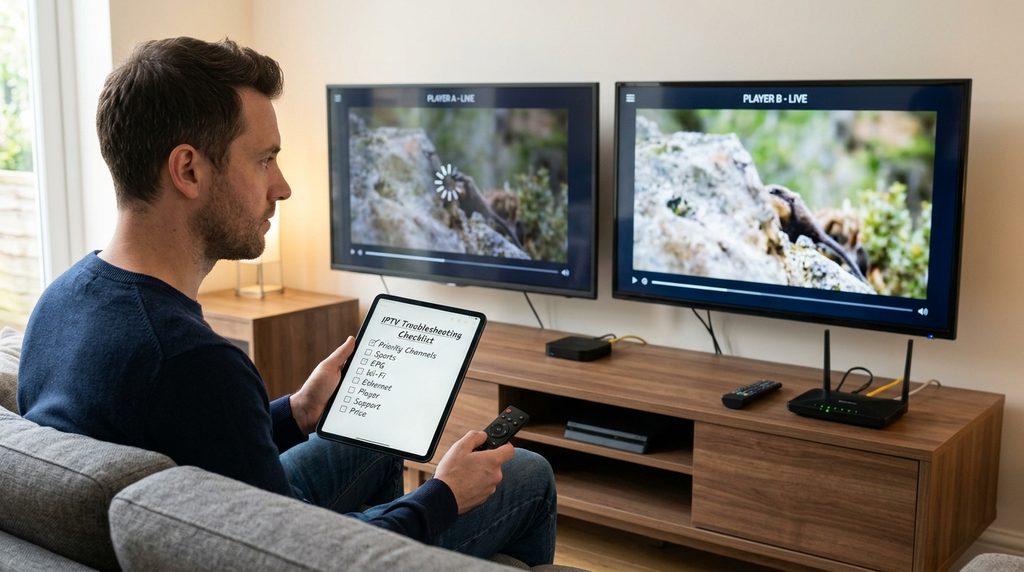
A useful Strong 4K IPTV review should focus on what you can verify yourself. Are your priority channels present? Does a major sports event stay stable? Is the EPG accurate enough to use every day? Does the player feel responsive on the television or streaming device you actually own? Can the seller answer a normal setup or renewal question before you pay? Those checks are far more valuable than a huge catalog number or a promise that every stream is “4K.”
If you are evaluating Strong8KTVs, start by reviewing the Strong8KTVs channel list and writing down the channels that matter most to your household. Then use the Strong8K free trial on the same device and internet connection you expect to use after subscribing. A controlled test gives you evidence from your own setup instead of asking you to trust another person’s experience.
Table of Contents
What Are You Really Buying With Strong 4K IPTV?
The first thing to understand is that Strong 4K IPTV is commonly sold through reseller-style networks rather than one universally recognized retail storefront. Different Strong-branded websites can target different countries or audiences, and their prices, channel claims, policies, account configurations, and support methods can differ. The seller is therefore part of the product experience, not just the person who collects payment.
A reseller can influence activation speed, regional channel groups, login details, connection limits, renewals, replacement credentials, and what happens if a server address changes. Two people can both say they bought Strong 4K IPTV and still receive accounts that are not configured in exactly the same way. One seller may enable more countries, another may offer a cleaner playlist, and another may have a very different support process.
This is why you should not take one website’s specifications and apply them to every account. A channel total, uptime claim, or device list describes that seller’s offer. Before paying, read the actual plan and ask a question that matters to your setup. If you need a particular country group, specific sports networks, more than one connection, or renewal on the same credentials, confirm it before checkout instead of assuming every seller handles it the same way.
How Much Should the “4K” Label Influence Your Decision?
The words Strong 4K IPTV can create the expectation that the whole channel library is delivered in native 4K, but internet television catalogs usually contain a mixture of resolutions. The original broadcaster, source feed, encoder, bitrate, distribution path, player, and device all influence what reaches your screen. A service may include genuine 4K feeds while most of the wider catalog remains HD or Full HD.
Your television can also upscale a lower-resolution stream to match a 4K panel. Upscaling may improve how the picture looks on the screen, but it does not turn a 1080p source into a native 4K broadcast. A player label cannot create source detail that was never present in the original video. For that reason, Strong 4K IPTV should be judged by the actual image you see rather than the number used in the branding.
During a trial, watch content that exposes picture problems. Sports reveal motion issues quickly. News channels make it easy to inspect text and graphics. Dark movie scenes can reveal compression artifacts. Pay attention to audio synchronization, frame drops, startup time, and whether the stream stays stable for a meaningful period. A clean Full HD feed that plays smoothly for two hours can be more enjoyable than a nominal 4K stream that freezes every few minutes.
Which Channels Matter More Than the Advertised Total?
Huge channel counts are easy to market because they create an immediate sense of value. Most households, however, repeatedly watch a much smaller group of local channels, sports networks, news, entertainment, children’s programming, movies, and international stations. Strong 4K IPTV becomes useful only if those specific channels are present, correctly labeled, and reliable when you want them.
Raw totals can also include regional versions, SD and HD copies, event channels, backup feeds, and several entries for popular networks. Those duplicates can be useful when one source fails, especially during sports, but they should not be confused with thousands of additional unique channels. The number at the top of a sales page does not tell you whether the content you care about actually works.
Before the trial, create a personal shortlist of around ten to twenty essential channels and compare them with the Strong8KTVs channel list. Then verify those channels inside the real Strong 4K IPTV account. Check language, audio, guide information, picture quality, and whether an alternative feed is available when a primary stream has trouble.
Priority
What It Means
What to Verify
Essential
You would not subscribe without it
Availability, stability, language, correct feed
Regular
You watch it frequently
Startup speed, guide data, picture quality
Bonus
Useful but not necessary
Browse only after essentials pass
This makes the buying decision much easier. Instead of being impressed by the total size of the library, you can judge whether the subscription actually fits your household.
Can Strong 4K IPTV Handle the Sports You Actually Watch?
Sports are one of the best real-world stress tests for Strong 4K IPTV because live events expose problems that may never appear during a quiet daytime channel. Football, boxing, Formula 1, basketball, UFC, NFL, NHL, and other live sports can reveal motion problems, audio delays, buffering, source instability, and slower recovery much more quickly than a static news broadcast or an on-demand movie.
The important question is not whether the service has a category called “Sports.” It is whether it includes the exact leagues, networks, countries, and events you follow. Someone who mainly watches Premier League football has different needs from someone who wants NBA, UFC, or Formula 1 coverage. Test the content that would actually determine whether you keep the subscription.
Use a Busy Live Event as the Real Stress Test
If possible, use part of the Strong 4K IPTV trial during a major live event. Watch long enough to judge camera movement, ball motion, commentary synchronization, loading speed, and whether the feed remains stable after the initial few minutes. If several versions of the event are available, compare them instead of assuming the highest-resolution label is automatically the best.
Peak-event testing also gives you a more realistic picture of how the service behaves under demand. One successful match cannot guarantee every future event will be perfect, but it is much stronger evidence than opening a sports channel for thirty seconds on a quiet afternoon. If sports are the main reason you are buying the service, this test should carry a lot of weight in the final decision.
How Much Can the Player and Device Change the Experience?
The subscription and the player are separate parts of the setup. Strong 4K IPTV supplies the authorized account or playlist, while the player organizes channels, EPG data, favorites, movies, series, search, and playback controls. Strong-related setup pages can list dedicated Strong players alongside TiviMate-style, Smarters-style, VIP, and other compatible applications, so you are not necessarily locked into one interface.
A player can affect startup speed, guide loading, category organization, subtitle handling, decoder compatibility, and remote navigation. If one app feels slow or crashes with a large playlist, another compatible player may work better with the exact same Strong 4K IPTV subscription. That is why changing the player can be useful without buying another service.
Your hardware matters too. A modern Fire TV or Android TV device with enough free storage and memory can handle a large playlist and EPG database more comfortably than an older stick or television. If categories take forever to open or the app closes while browsing, the device may be part of the problem. Test Strong 4K IPTV on the hardware you actually intend to use every day instead of judging the whole service from a phone.
M3U and Xtream Logins Need the Right Setup
Many Strong 4K IPTV accounts use familiar IPTV login formats. M3U usually comes as a long playlist URL, while Xtream-style access separates the server or portal address, username, and password. Some dedicated apps may already contain the server configuration and ask only for account credentials. Whatever method you receive, use that exact format instead of trying to convert it using a random tutorial.
A missing character, extra space, wrong protocol, or unrelated server address can stop a valid account from loading. If the login fields do not match the information the seller gave you, ask which setup method is intended rather than guessing. Also keep those credentials private. M3U links can contain usernames and passwords directly inside the URL, so a public screenshot can expose access to your Strong 4K IPTV account.
Will the EPG and Favorites Make Daily Viewing Easy?
The Electronic Program Guide is easy to ignore during the first few minutes of a trial, but it becomes important once Strong 4K IPTV is used every day. A huge playlist is frustrating when guide data is missing, categories are scattered, the time zone is wrong, or the same channel appears in several unrelated places. The EPG is what turns a long list of streams into something closer to normal television.
After the first sync, create a favorites group with the channels you actually use. Hide categories you never watch if the player supports it. Check whether current and next-program information appears for your priority channels and whether your favorites remain saved after restarting the app. A well-organized setup can make thousands of channels feel much smaller and easier to manage.
If guide information is missing in one player, compare another compatible player before assuming the subscription contains no EPG data. If the same channels are missing guide information in every supported player, the guide source or account configuration becomes a stronger suspect. This is another reason player comparison can help with troubleshooting.
When Strong 4K IPTV Buffers, What Should You Test First?
Buffering is one of the easiest problems to blame on the provider, but Strong 4K IPTV is only one link in the chain. Weak Wi-Fi, an overloaded router, background downloads, ISP routing, VPN congestion, device memory, player decoding, and the original source can all create freezes that look almost identical. Reinstalling the app immediately does not tell you which component is responsible.
Start by determining whether the problem affects one channel or many. Test another channel in the same category, then a completely different group. Restart the stream and device, check whether other streaming apps work normally, and compare Wi-Fi with Ethernet when possible. If large downloads or cloud backups are active, pause them temporarily. Then try the same Strong 4K IPTV account in another compatible player.
Change One Variable at a Time
Test another channel in the same category.
Try a channel from a different group.
Restart the stream and player.
Restart the television or streaming device.
Check another video service on the same hardware.
Compare Wi-Fi with Ethernet when possible.
Pause large downloads and cloud backups.
Try another compatible IPTV player.
Test a second supported device before contacting support.
If one player buffers while another handles the same stream smoothly on the same hardware and network, the first app deserves more attention. If every player and device struggles with the same channels while Netflix, YouTube, and other services work normally, the source or the service becomes a stronger suspect. Testing during the hours when you normally watch also matters because a stream that performs perfectly in the afternoon can behave differently during a busy evening or major event.
How Much Should the Seller and Legal Risk Affect Your Choice?
Seller quality deserves attention because different websites and resellers can advertise Strong 4K IPTV under similar branding while using different prices, policies, checkout methods, and support channels. Before choosing a long plan, ask one genuine question about your device, required country package, connection limits, or renewal procedure. A useful response before payment is a better sign than a sales page that promises everything but cannot answer a basic setup question.
If you are considering Strong8KTVs, use the Strong8KTVs contact page to clarify anything important before paying. Good support cannot guarantee flawless streaming, but poor communication before purchase is a warning sign because activation, renewal, or account changes become much harder when nobody gives clear answers.
The source material also raises a separate legal concern. It cites a submission to the U.S. Trade Representative from beIN Media Group and Miramax that identified “4K/Strong 4K” and related services as part of an alleged pirate IPTV network distributing copyrighted channels without authorization. That is an allegation made by rights holders, not a court judgment, but it is still a material warning for anyone researching Strong 4K IPTV.
A polished website, familiar channel logos, or a huge catalog do not prove that a seller has distribution rights. If legality matters to your decision, verify who operates the service, what licensing claims are made, and whether those claims fit the country where you plan to use it. Payment security matters too: use methods you understand, keep order records, and do not send full card details, banking passwords, or authentication codes through informal support chats.
Strong 4K vs Strong 8K: Does the Name Change the Buying Decision?
Strong 4K and Strong 8K can sound like two completely separate products, but reseller pages often use the branding in overlapping ways. Strong-related app directories can also list both Strong 4K and Strong 8K-oriented players in the same broader ecosystem. That makes the number in the name less useful than the exact account, seller, channel lineup, device support, and real stream quality.
Area
Strong 4K-Style Offer
Strong 8K-Style Offer
Branding focus
4K / UHD
8K / 4K / UHD
Real stream mix
Usually several resolutions
Usually several resolutions
Player options
M3U, Xtream, dedicated apps
Similar player ecosystem
Device support
TV, Android, Fire TV, mobile, desktop
Similar broad support
What matters most
Actual channel quality and stability
Actual channel quality and stability
Price should also come after testing rather than before it. Strong 4K IPTV prices can differ depending on the seller, region, number of connections, and subscription duration. A cheap annual plan is poor value if your priority channels fail every weekend, while an expensive plan is not automatically better just because the seller charges more.
After the trial, compare the Strong8KTVs pricing plans and choose a duration that matches your confidence. A shorter plan can reduce commitment while you learn how the service behaves over time. A longer plan may offer a lower effective monthly cost, but it creates more risk if the seller, service, or your viewing needs change.
Frequently Asked Questions About Strong 4K IPTV
Is Strong 4K IPTV Really Native 4K?
Some streams may be available in 4K, but the name should not be treated as proof that the entire catalog is native 4K. The original source, encoding, bitrate, network, player, device, and display determine the final picture. Judge Strong 4K IPTV by the real streams you care about rather than the branding alone.
Does Strong 4K IPTV Work on Firestick?
Strong-related setup pages describe Android and Fire TV-oriented player options. Fire TV users should test the account on the exact hardware they plan to keep using because older devices can struggle with large playlists and guide databases. Verify the current app source before sideloading, since APK locations and Downloader codes can change.
Can I Use TiviMate With Strong 4K IPTV?
Potentially, yes, when your authorized account provides a compatible M3U or Xtream-style login and the seller permits that setup. A player such as TiviMate can be useful for viewers who want stronger EPG organization, favorites, and playlist controls. Use only your own account details and verify server information with the seller.
Why Is Strong 4K IPTV Buffering?
The cause can be the source feed, server load, ISP route, Wi-Fi, VPN, player, decoder, or streaming device. Compare another channel, another player, and another network condition before deciding the subscription itself is responsible. If the same failure appears everywhere while other internet services work normally, the source or provider becomes more likely.
Should I Buy a One-Year Plan Immediately?
Testing first is usually the more sensible choice. Verify channels, sports, EPG quality, device performance, peak-time stability, seller support, connection limits, and renewal terms before committing to a long Strong 4K IPTV subscription. A shorter plan gives you more time to learn how the service behaves after the initial trial.
How Many Channels Should I Test During the Trial?
You do not need to open hundreds. Pick roughly ten to twenty channels that represent your real viewing. Include essential live channels, sports if relevant, and a few different categories. A focused Strong 4K IPTV trial gives you more useful information than opening every channel for a few seconds.
Does a Bigger Channel Count Mean a Better Service?
No. Large totals can include duplicates, backup feeds, regional versions, and channels you will never watch. Strong 4K IPTV is more valuable when your priority channels are reliable and easy to find than when the catalog simply contains the biggest number.
Is Strong 4K IPTV the Same as Strong 8K?
The branding can overlap across reseller sites and player directories, so the names alone do not prove that the accounts are fundamentally different. Compare the exact seller, plan, channel lineup, login method, device support, and real playback quality rather than choosing only by the number in the name.
Is Strong 4K IPTV Worth Trying in 2026?
Strong 4K IPTV can be worth evaluating if you want live television, sports, international channels, movies, series, and flexible player choices in one subscription. The service name is used across different reseller websites, which means seller differences matter. Channel totals, prices, policies, support, and account configurations can vary, so the real trial should carry more weight than the sales page.
Start with the Strong8KTVs channel lineup and identify the content your household actually watches. Request the free trial, test Strong 4K IPTV on your primary device, include a real sports event if sports matter, organize the EPG and favorites, and compare another compatible player if you need to separate an app problem from a service problem.
Judge the seller too. Use the Strong8KTVs support page when a plan, login, connection limit, or renewal detail is unclear. Keep the legal warning from the source in mind and decide what level of verification you require before purchasing. Once the service performs consistently under your own conditions, compare the pricing plans and choose a duration that matches your confidence.
The best reason to choose Strong 4K IPTV is not the 4K label or the biggest catalog. It is that the channels you genuinely watch are available, sports and peak-time viewing remain stable enough for your needs, the interface feels comfortable on your device, and the seller provides enough support for the setup to remain practical after the first week.